
DUCKAD APP GUIDE (MUSIC SHOW DIGITAL HELP)
- TEMPEST SUPPORT LAND
- 11 thg 6, 2023
- 1 phút đọc

Đã cập nhật: 14 thg 6, 2023
How to create accounts, collect votes and voting guides for Duckad app (Digital helpful app)
How to create account?
- Download 'Duckad' app
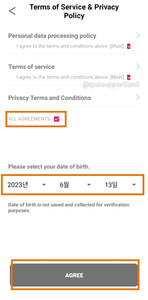
- Open 'Duckad' app. Choose 'Login' then you can create new account with Google or Kaokao account
- Check 'All Agreements', select your date of birth and click 'Agree' to successfully log in


How to collect votes?
- You can collect votes by these following method
Check daily attendance: Choose 'Ticket icon' then click blue banner in the top to check attendance
Read news: 5 votes per news
Do missions: Number of votes collected depend on each mission
Wacth ads: Choose '20+ vote' button to watch ads. 20 votes per ad
- Votes will expire every 90 days


How to request TEMPEST songs on Duckad?
- Click 'Streaming icon', find 'Request' button in the top of the right
- Enter TEMPEST tittle name and fill TEMPEST as the artist. Don't forget to check carefully then click 'request'



How to vote for TEMPEST?
- Click 'Streaming icon'. Search for TEMPEST tittle song or search TEMPEST
- Choose TEMPEST tittle song. Select number of votes and Korean music platform (Melon, Gennie, Bugs) you want to vote for and click 'Get the votes'
- Remember to like TEMPEST tittle song
- Voting method: 500 votes = 1 stream. If you have streaming account, you can stream any song to get 300 votes per song


Bình luận